Forex Order Types: Market, Limit, Stop and OCO Explained
Forex order types explained: market, buy limit, sell limit, buy stop, sell stop, stop loss, take profit, trailing stop, OCO and slippage, with a EURUSD example.
This site contains affiliate links. We may earn a commission if you sign up through our links. How we research
A forex order is an instruction to your broker to open or close a position. A market order executes at once at the current price. A pending order (buy limit, sell limit, buy stop, sell stop) waits until price reaches a level you choose. A stop-loss and a take-profit are orders attached to a position to close it at a set loss or profit.
Disclosure: OnForex may earn a referral commission from Exness links on this page. This is general education, not investment advice.
Choosing the wrong order type is a common and avoidable mistake, for example placing a "buy stop" when you meant a "buy limit". This page defines every common order, shows all four pending orders on one chart, walks through a EURUSD example, and explains what slippage and gaps do to stops.
Order types at a glance
| Order | Direction vs current price | Fills when | Typical use |
|---|---|---|---|
| Market buy / sell | Now | Immediately | Enter or exit right away |
| Buy limit | Below price | Price falls to your level | Buy a pullback |
| Sell limit | Above price | Price rises to your level | Sell a rally |
| Buy stop | Above price | Price rises through your level | Buy a breakout |
| Sell stop | Below price | Price falls through your level | Sell a breakdown |
| Stop-loss | Attached to a position | Price moves against you to the stop | Cap the loss |
| Take-profit | Attached to a position | Price reaches the target | Lock in the gain |
| Trailing stop | Attached to a position | Price retraces from its best level | Follow a trend |
A useful memory trick: limit orders wait for a better price (buy low, sell high). Stop orders wait for confirmation (buy when it breaks up, sell when it breaks down).
The four pending orders on one chart
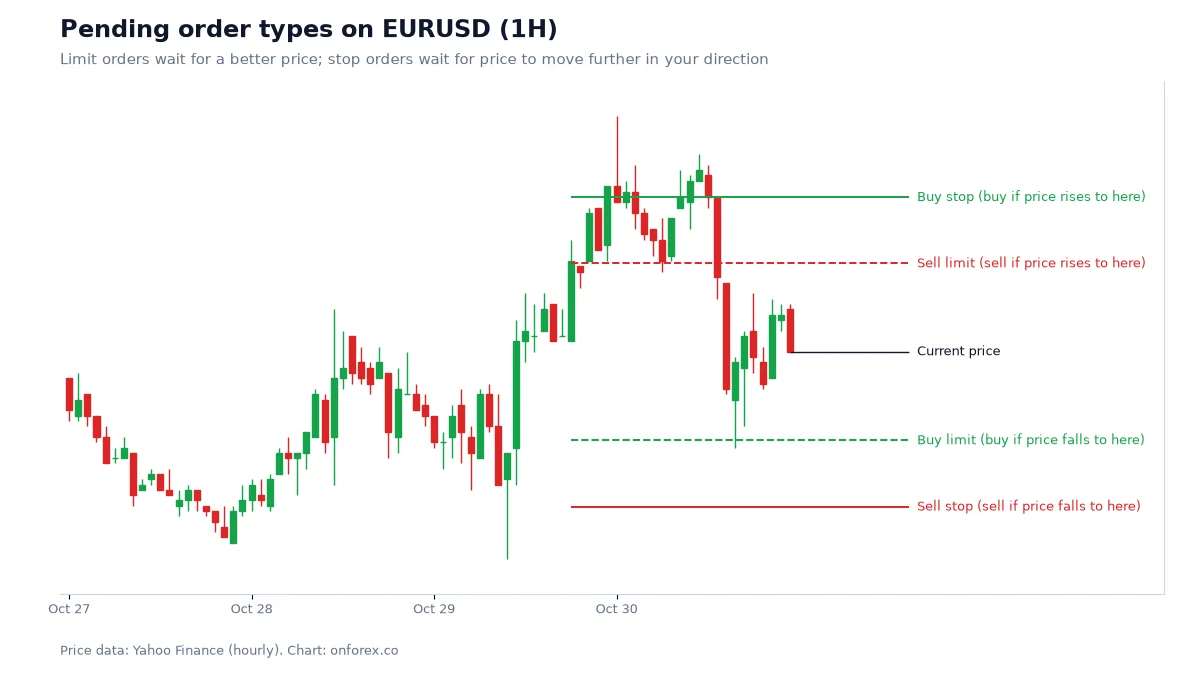
Limit orders sit on the side where price would have to reverse to reach them. Stop orders sit on the side where price would have to continue to reach them. That is why a buy limit is below the market and a buy stop is above it, and why platforms reject a pending order placed on the wrong side.
Market orders and execution
A market order is filled at the best available price when it reaches the server. You see a bid and an ask; you buy at the ask and sell at the bid, and the difference is the spread. Spreads widen around news releases, the daily rollover and market opens, so a market order placed then costs more.
Two execution styles exist. With market execution you accept whatever the price is at the moment of fill. With instant execution you request a price and the broker may send a requote if it moved. Many retail accounts now use market execution, so slippage replaces requotes. See slippage and spread explained.
Pending orders in detail
Buy limit and sell limit
A buy limit is placed below the current price. If price falls to it, you buy. It fills at your price or better. A sell limit is the mirror image above the price.
Use them when you have a level in mind, such as a pullback into support, and do not want to chase. The risk is that price never reaches the level and runs away without you, or reaches it and keeps going.
Buy stop and sell stop
A buy stop is placed above the current price. If price rises through it, a buy order is triggered. A sell stop is placed below the price and triggers a sell on a drop.
Use them for breakouts, such as above a range high. Because they trigger on a move through a level, they are filled at the next available price, which can be worse than the one you set. This matters most during news and after weekends.
Stop-limit orders
MetaTrader 5 also offers buy stop limit and sell stop limit. When the stop price is reached, a limit order is placed instead of a market order. That avoids a bad fill but can leave you unfilled if price keeps moving.
Stop-loss, take-profit and trailing stop
A stop-loss (SL) closes a position when price moves against you by a set amount. A take-profit (TP) closes it at a target. Together they define the trade's risk and reward before you enter, and the ratio of reward to risk is called R. See risk-reward ratio and stop-loss placement.
A trailing stop moves the stop in the direction of profit by a fixed distance and never moves it back. It lets a winner run while protecting open profit. Platforms differ: some trail only while the terminal is running. Details are on the trailing stop page.
Why stop placement matters: our data
We tested a random entry on hourly data for four markets (OnForex analysis of hourly prices from Yahoo Finance, January 2024 - October 2026; gold: June 2024 - October 2026, COMEX gold futures). We asked how often a stop placed k times ATR(14) away was hit within 24 hours.
| Stop distance | EURUSD | GBPUSD | USDJPY | XAUUSD |
|---|---|---|---|---|
| 0.5 ATR | 88% | 88% | 86% | 87% |
| 1 ATR | 78% | 77% | 73% | 74% |
| 1.5 ATR | 66% | 66% | 61% | 62% |
| 2 ATR | 56% | 56% | 51% | 52% |
| 3 ATR | 40% | 40% | 34% | 35% |
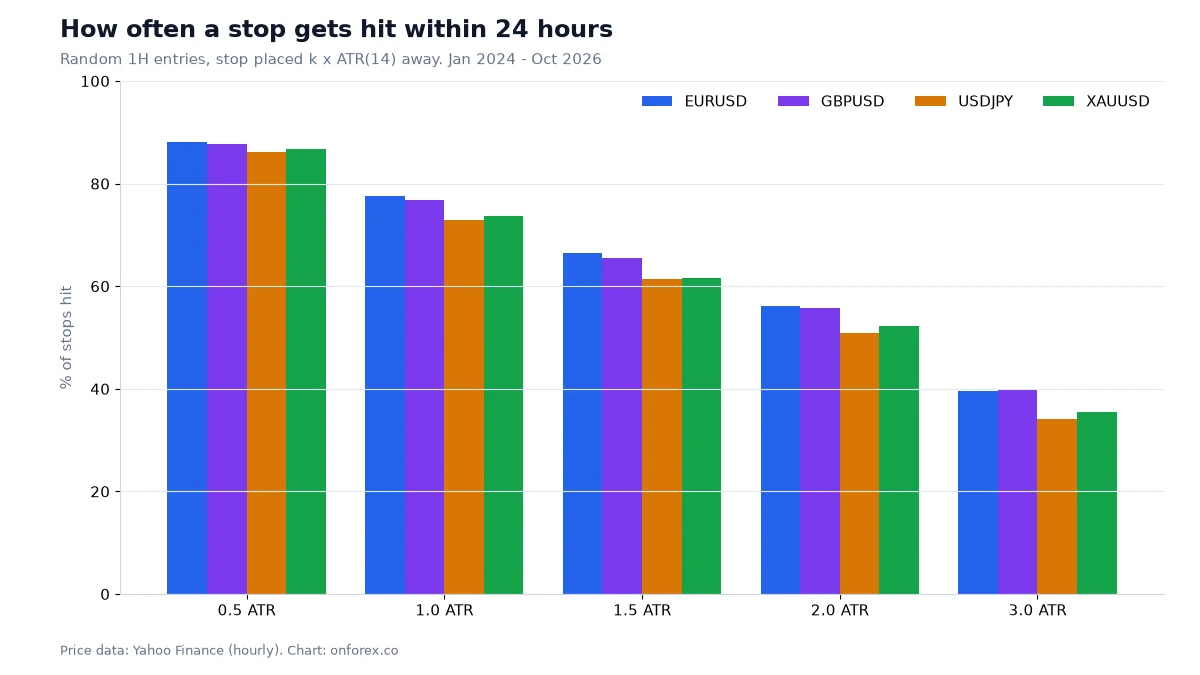
A 1 ATR stop was hit in 73-78% of 24-hour windows. Tight stops are not safe stops; they simply get triggered by normal movement. The order type does not fix this. A wider stop with a smaller position size does, which is covered in position sizing.
OCO, IFD and IFDOCO
Some platforms, especially in Japan and on web-based terminals, offer linked orders:
- OCO (one cancels the other): two pending orders, such as a sell limit above and a sell stop below. When one fills, the other is cancelled.
- IFD (if done): a second order is activated only after the first fills, typically an entry followed by an exit.
- IFDOCO: an entry order followed by an OCO exit pair, a take-profit and a stop-loss. This is effectively an entry, a target and a stop in one instruction.
MetaTrader 4 and 5 do not have a native OCO. In MetaTrader you attach SL and TP to the position directly, which achieves the same exit logic for most traders. Check what your own platform supports.
Order duration
A pending order can have an expiry. Good till cancelled (GTC) stays until you remove it. Day orders expire at the end of the trading day. Some platforms allow a specific date. Remove stale pending orders; an old buy stop can trigger weeks later in a completely different market.
A worked example on EURUSD
Assume EURUSD trades at 1.1167 and your account is USD 1,000. The levels below are illustrative, not a trade recommendation.
Plan A: buy a pullback with a buy limit. Buy limit at 1.1150, stop-loss at 1.1130, take-profit at 1.1190.
- Risk = 20 pips. Reward = 40 pips. That is 2R.
- With 1% risk (USD 10) and a pip value of about USD 10 per standard lot on EURUSD, size = 10 / (20 x 10) = 0.05 lots.
Plan B: buy a breakout with a buy stop. Buy stop at 1.1190, stop-loss at 1.1170, take-profit at 1.1230.
- Risk = 20 pips. Reward = 40 pips. Also 2R, same 0.05 lots.
If price drops straight through 1.1130 over a weekend and re-opens at 1.1105, a standard stop-loss fills near the open, not at 1.1130. A 20-pip planned loss becomes 45 pips, over twice the intended risk. Slippage and gaps are why a position should be sized so that a worse-than-planned fill is still survivable. This is the argument for 0.5-1% risk rather than 5-10%.
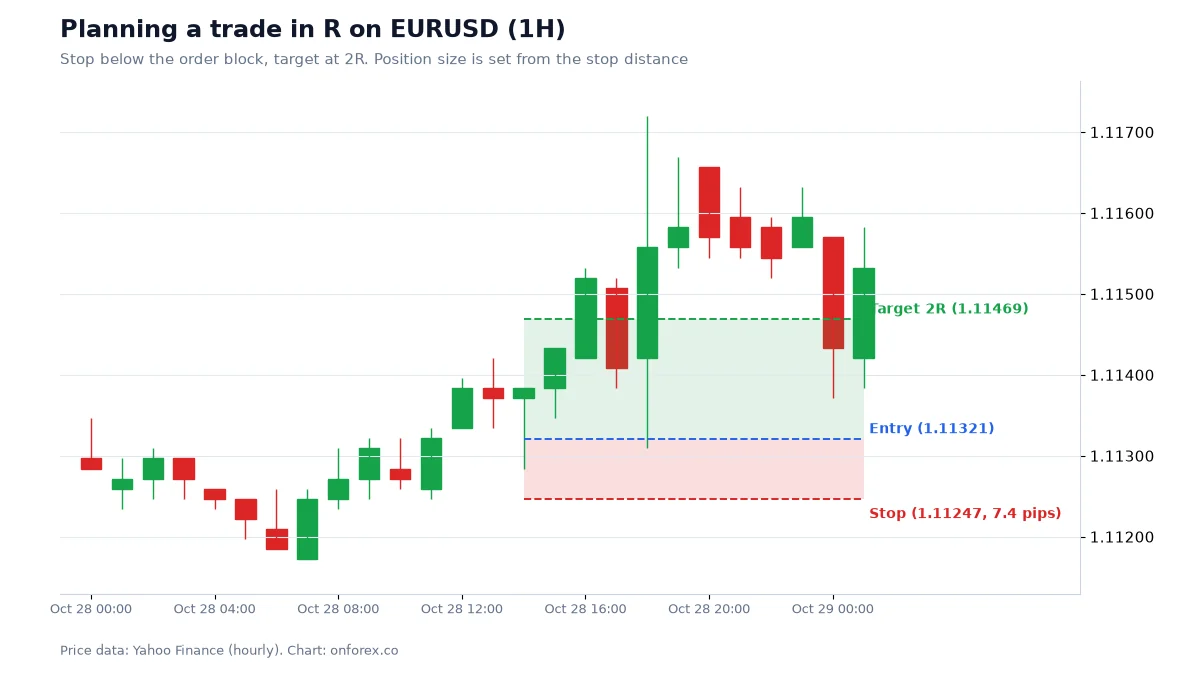
A real trade plan of this kind, in R, is on our trade plan in R example:
Slippage, gaps and requotes
- Slippage is a worse (or better) fill than requested. It rises when volatility spikes, liquidity thins or you trade size.
- Gaps occur when price opens far from the previous close, typically on Monday after the weekend. Any stop or limit inside the gap is skipped.
- A limit order fills at your price or better. A stop order becomes a market order and fills at the next price.
- A requote happens under instant execution when the price moves before the broker fills you.
Expect all of this around scheduled releases; see news trading and the economic calendar.
Common mistakes
- Confusing limit and stop. Buying a "stop" below the market is rejected or fills instantly, depending on the platform.
- No stop-loss attached. A pending order that fills without a stop leaves an open risk.
- Stops too tight. See the table above: a 0.5 ATR stop was hit 86-88% of the time in a day.
- Leaving old pending orders. Remove them at the end of your session.
- Trading the news with pending orders. A buy stop above and a sell stop below before a release looks clever, but spreads widen and both orders can fill badly.
- Ignoring weekend gaps. Size positions assuming the stop may not fill where planned.
Which order for which situation
| Situation | Reasonable choice |
|---|---|
| You want to enter right now | Market order with SL attached |
| You want to buy a pullback to a level | Buy limit |
| You want to buy only if a high breaks | Buy stop |
| You want to protect an open profit | Trailing stop or move SL to break-even |
| You cannot watch the chart | Pending order with SL, TP and expiry |
Whichever order you use, decide the stop first, then size the position from the stop distance, then place the entry.
Practise on a demo account first
Place market and pending orders, attach stops and watch how they fill on a free Exness demo account before you risk money. Forex and CFD trading carries a high risk of loss.
Continue to ExnessForex and CFD trading involves significant risk. You may lose your invested capital.
Related guides
Risk warning: Forex and CFD trading carries a high risk of loss. Stops are not guaranteed and may fill at a worse price. This page is general education and not personal investment advice.
Related Articles
Trailing Stop Loss in Forex: Trailing, Break Even and Partial TP
How a trailing stop loss works in forex, plus break even stops and partial take profit, compared on the same EURUSD entries with our own test data.
ATR Indicator: Formula, Settings and ATR Stop-Loss in Forex
ATR explained: how Average True Range is calculated with a worked example, the 14-period setting, ATR stops, position sizing and our stop-hit data.
Liquidity Sweep Explained: Stop Hunts, BSL and SSL
What a liquidity sweep is, how buy-side and sell-side liquidity form, how a sweep differs from a breakout, and what 1,294 sweeps in our data showed.
Drawdown in Forex: Max Drawdown, Recovery Math and Limits
Drawdown explained: how to measure maximum drawdown, why a 50% loss needs a 100% gain, how long losing streaks last, and daily and weekly loss limits.
Forex Risk Management: How to Calculate Risk per Trade
Forex risk management step by step: calculate lot size from a 1% risk and a stop-loss, with USD 1,000 and USD 2,000 EUR/USD examples, drawdown and analytics.
Forex Slippage Explained: Causes, Types and How to Limit It
What slippage is, why positive and negative slippage happen, which order types are affected, and what you can do to limit it when markets move fast.